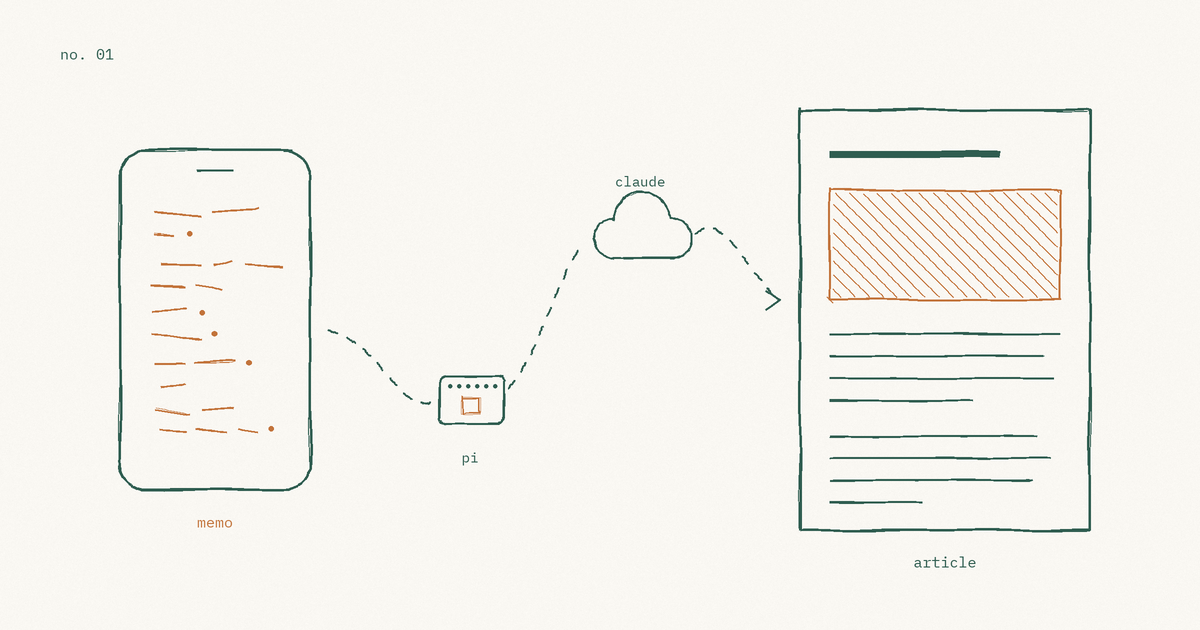
I send a memo from my iPhone to Discord, and a Raspberry Pi bot and AI suggest topics, ask me questions, write a draft, and publish it once I approve. Here is the system layout, how each of the five stages works with real code, and the rules I set while building it.
The posts on this blog are written with a system where I send a memo from my iPhone to Discord, answer the AI’s questions, and get a draft. This post walks through how it works, in order from sending a memo to publishing, with the actual files and code along the way.
The big picture
The server that runs the Discord bot is a Raspberry Pi 4 (4GB) that was sitting unused at home. Cloudflare hosts the blog and stores the photos. The AI is Claude Pro, and it can work directly on the Raspberry Pi server.
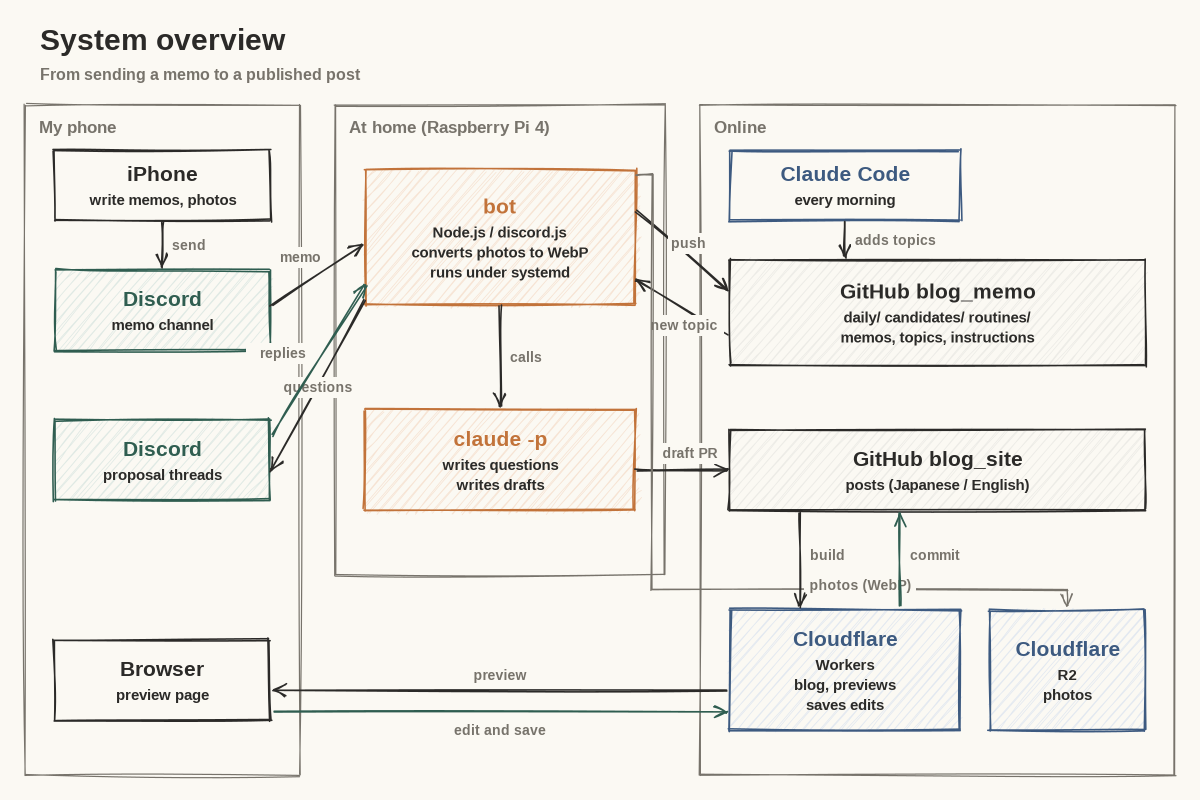
Here is what each part does.
| Role | What I use |
|---|---|
| Sending memos and photos | iPhone and Discord (two channels: one for memos, one for proposals) |
| Receiving and relaying | A bot running 24/7 on a Raspberry Pi 4 (Node.js 22, discord.js) |
| Picking topics, asking questions, drafting | Claude Code (a scheduled run every morning, and claude -p calls from the Raspberry Pi) |
| Storing memos and posts | GitHub (two private repositories, one for memos and one for the blog) |
| The blog itself | Astro and Cloudflare Workers |
| Storing photos | Cloudflare R2 |
The bot is written in JavaScript (Node.js 22). It uses discord.js to talk to Discord, sharp to convert images, and the AWS SDK to upload to R2. It is registered as a systemd user service, so it starts automatically when the Raspberry Pi reboots and restarts right away if it crashes.
Every record lives in Markdown files on GitHub. Both the bot and the AI pass state to each other by reading and writing these files. There is no database or admin screen, so a quick look at the files tells you how far each post has gotten.
How it works
1. Sending a memo
When something comes to mind, I send a short note to the memo channel on Discord. If I attach a photo, it is saved along with the memo.
When the Raspberry Pi bot sees a new post, it appends the memo with a timestamp to a file for that day and pushes it to GitHub. A day’s file looks like this.
---
date: 2026-10-05
---

- 08:12 [msg:message-id] memo text
- image: 2026-10-05_message-id_01.webp (original: IMG_1234.HEIC) / what it shows: a short noteHere is the code that receives a memo. Appending and committing happen inside a single queue so they never run at the same time as pulling from GitHub. When I post several memos in a row, it waits 10 seconds and pushes them together.
async function handleMemo(message) {
  const { date, time } = localParts(message.createdAt, config.timeZone);
  const images = await downloadImages(message, date, config.dataDir);
  const entry = formatEntry({ time, messageId: message.id, text: message.content, images });

  // Append and commit inside the queue so they don't overlap with a pull
  const added = await repo.enqueue(() => appendEntry(config.repoDir, date, entry, message.id));
  if (added) {
    const rel = path.relative(config.repoDir, dailyPath(config.repoDir, date));
    await repo.commit([rel], `daily: ${date} ${time} のメモ`);
    schedulePush(); // when posts arrive back to back, wait 10 seconds and push once
  }
  await message.react('✅');
}Photos are converted to 1200px-wide WebP and stored in Cloudflare R2, named “date_message-id_sequence”. iPhone photos are often in the HEIC format, so the bot first turns them into PNG with heif-dec and then converts them with sharp. The photo’s orientation (EXIF) is applied here as well.
export async function toWebp(originalPath, outDir, width = 1200) {
  const out = path.join(outDir, webpName(path.basename(originalPath)));
  const input = await readableInput(originalPath); // HEIC is converted to PNG with heif-dec first
  await sharp(input)
    .rotate() // apply the photo's orientation (EXIF)
    .resize({ width, withoutEnlargement: true })
    .webp({ quality: 80 })
    .toFile(out);
  return path.basename(out);
}After a file is uploaded to R2, the bot leaves a small marker file next to it, so uploads can resume if the connection drops partway. When saving is done, the bot adds a ✅ to the original post.
2. AI picks topics every morning
A little before 7 a.m. (Japan time), a scheduled Claude Code run (a routine) reads the memos. It runs in Anthropic’s cloud, so it works even when the Raspberry Pi or my computer is off.
The AI picks memos from the last seven days that could become posts and creates one file per topic. On days with few memos, it suggests up to three ideas in the form of “Why not try this?”, such as stories from my own experience or things I could try with tools I already have. A topic file looks like this.
---
id: topic-id
date: 2026-10-05
status: discord
thread:
sources:
  - daily/2026-10-05.md
images:
  - path: 2026-10-05_message-id_01.webp
    original: IMG_1234.HEIC
---

## Source memo

## Proposal

## Conversation

- 2026-10-05 08:30 User: ...
- 2026-10-05 08:31 Claude: ...When the bot finds a topic file with an empty thread, it posts the proposal and the first question to the proposal channel and starts a thread for that topic. It writes the thread’s number back into thread, so the same topic is never proposed twice. status records where the topic is being worked on (Discord, my computer, on hold, or drafted).
3. AI asks questions in the thread
When I reply in the thread, the bot adds my reply to the “Conversation” section of the topic file and calls Claude Code on the Raspberry Pi to come up with the next question. There is no limit on the number of questions. Memos tend to be short and vague, so the AI is told to ask for concrete examples or numbers when an answer is vague.
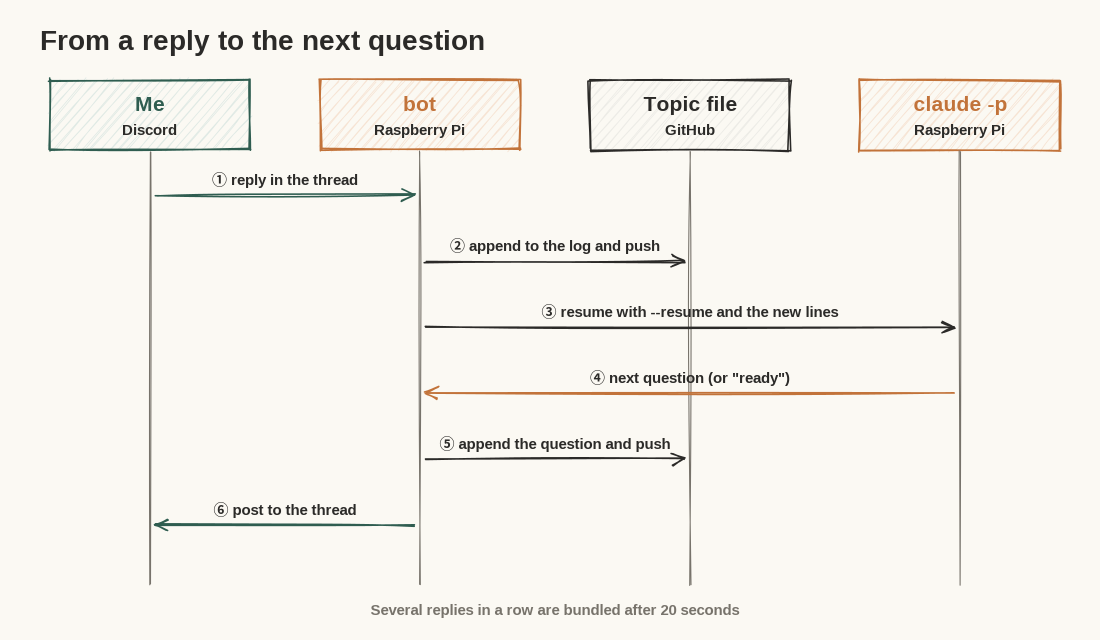
Claude Code is called in its -p form, which runs once without a screen. Each topic has its own conversation (session), and from the second call on, the bot resumes it with the previous session ID. When I send several replies in a row, it waits 20 seconds and passes them to the AI together.
// Resume the topic's session; if that fails, reread the topic file and start a new one
export async function nextQuestion({ repoDir, id, sessionId, newLines }) {
  const base = ['--output-format', 'json', '--allowedTools', 'Read,Glob,Grep'];
  if (sessionId) {
    try {
      return await runClaude(['-p', buildPrompt(id, newLines, true), '--resume', sessionId, ...base], repoDir);
    } catch (err) {
      console.error(`Could not resume session ${sessionId}. Starting a new one`);
    }
  }
  return runClaude(['-p', buildPrompt(id, newLines, false), ...base], repoDir);
}When writing questions, the AI is only allowed tools that read files (Read, Glob, Grep). Before the call, the bot also removes the API key from the environment, so it runs within my Claude Pro plan instead of the pay-as-you-go API. Once it has what the post needs, the AI sends a signal along with an outline and image ideas for each section, and the image ideas come in two kinds: diagrams the AI can make and photos it asks me to take.
Every exchange with the AI is saved in the topic file with the speaker and time. The Raspberry Pi, the morning scheduled run, and Claude Code on my computer cannot see each other’s conversations, so when a session resumes, the prompt includes whatever was added to the topic file since the last call.
The design treats the topic file, not the conversation history, as the official record, so the story stays connected wherever I continue.
4. A draft and a preview page
When everything is ready, the Raspberry Pi starts writing the draft right away. How to write a draft is described in a single instruction file for the AI, and the Raspberry Pi, the cloud scheduled run and my computer all follow the same file. For example, it spells out which topics should become drafts.
## Topics to draft

Up to two topics per run, oldest first, that meet all four conditions:

- `status` is neither `draft` nor `pc`
- the frontmatter has no `working:` (someone else is working on it)
- the conversation contains Claude's "ready" message,
  or I asked "make it a draft" / "turn it into a post"
- I haven't replied again since thenThe draft is written in Japanese and English at the same time. Diagrams like the ones in this post are drawn by the AI as SVG, and where a photo is missing it adds a box saying “please take this photo”. In the post file, these are written as components like the following.
<Figure src="2026-10-05_message-id_01.webp" alt="photo description" size="70" />
<PhotoRequest request="The Raspberry Pi from above at an angle, with the cables plugged in" />The production build stops while any PhotoRequest remains, so a post never goes live without its photos.
The writing rules live in a separate file, and each rule came from things I wanted fixed after reading the first drafts.
The draft is submitted to the blog repository as a pull request (a proposed change). Cloudflare then builds a preview page automatically, and its URL is posted to the Discord thread.
5. Editing and publishing
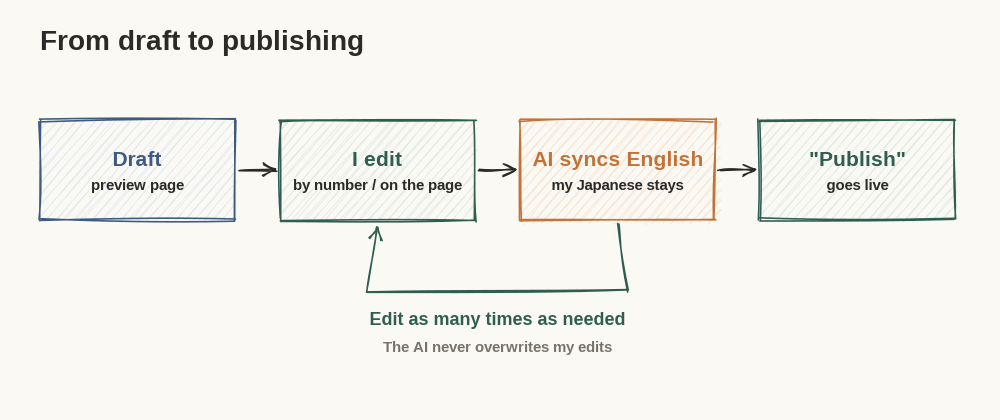
On the preview page, each paragraph or heading gets a number like “#1” or “#2”. If I send “#3 not needed” or “add the farm story after #5” on Discord, the AI fixes it on the spot. The numbers are simply assigned from the top to the outermost elements of the rendered HTML, so the AI gets the same numbers when it counts them on its side.
I made it possible to fix small wording myself right on the preview page. When I rewrite and save, Cloudflare Workers commits directly to the draft branch, and the change shows up within a few minutes. I can also add photos, change a photo’s width as a percentage of the text width, and crop it.
The Worker that accepts these saves only allows writing to draft branches and Japanese post files.
/** Only allow draft branches and Japanese post files */
function checkDraftTarget(branch: string, path: string) {
  if (!/^draft\/[a-z0-9-]+$/.test(branch)) return json({ error: "bad_branch" }, 400);
  if (!/^src\/content\/posts\/ja\/[a-z0-9-]+\.mdx?$/.test(path)) {
    return json({ error: "bad_path" }, 400);
  }
  return null;
}It replaces text only when the original sentence appears exactly once in the file, then commits through the GitHub API. If the file was changed somewhere else first, it returns an error instead of saving.
const file = await readDraftFile(env, branch, path);
if (file instanceof Response) return file;
const notOnce = countError(file.text, before); // 0 times: changed, 2+ times: ambiguous
if (notOnce) return notOnce;

const next = file.text.replace(before, () => after);
const failed = await writeDraftFile(
  env, branch, path, next, file.sha, "校正: プレビューから文を直した",
);After I edit the Japanese version, the AI retranslates only the matching parts of the English version. The rule is that if the Japanese file’s latest commit is newer than the English one, I made edits, and only that difference is carried over to the translation. Unless I ask, the AI does not touch the Japanese sentences I edited. Finally, I send “publish” on Discord, the pull request is merged, and the post goes live.
Rules I set while building it
The system runs in several places at once, so I added a few rules to keep them from colliding.
- The topic file is the official record. Conversation history is only a helper, and work resumes by rereading the topic file
- While a draft is being written, the topic file gets a
working: raspi date-timemark. Other places leave marked topics alone. A mark older than one hour is treated as stalled - My preferences file has a section I write and a section for the AI’s guesses. The AI only rewrites its guesses
- Before pushing, always pull in the changes from GitHub first. On a conflict, wait a little and retry up to four times, keeping my edits
- Tokens and keys live only in the Raspberry Pi and Cloudflare settings, never in the repositories
How it has been so far
The question-and-answer style really is easier. Starting to write on my own and thinking about what readers would want to know are both hard for me, so I set it up so the AI asks and I answer.
Since I had the AI do all of the building, it honestly was not much of a hassle. If anything, giving layout instructions may have been the hardest part, because I had to gather links and images of sites I wanted to use as references.
I did feel the AI was not very good at small wording fixes, though, so now I make those myself and the AI just keeps the English version in sync.
Honestly, I am still fixing things a lot, so once I tidy up the system’s files and they become easier to use, I plan to make them public on GitHub.
Related posts
Moving my blog system to Muse retired my home server
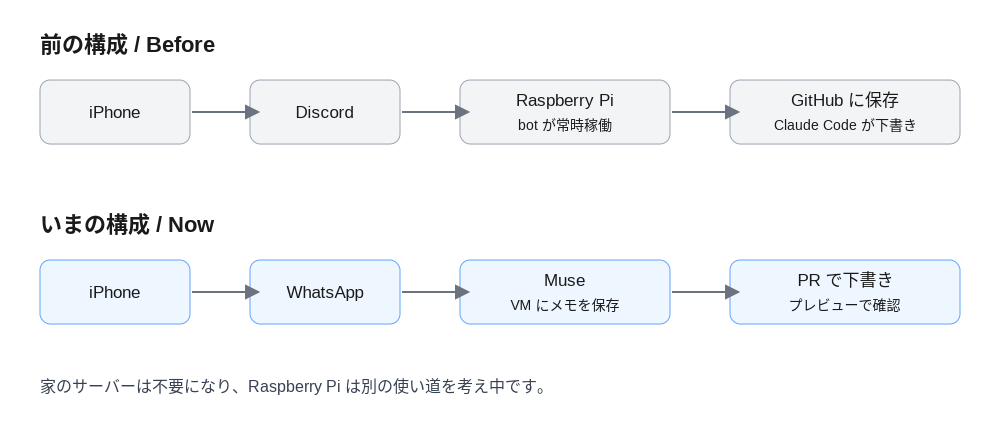
I moved the blog drafting system I had built with Discord, a Raspberry Pi, and Claude Code over to WhatsApp and Muse. What changed about the entry point and storage, why the Raspberry Pi is no longer needed, and how I handle having a single thread.
About 500 wordsBloggingRaspberry Pi
I Made a Discord Activity (Gomoku) with Cloudflare Workers
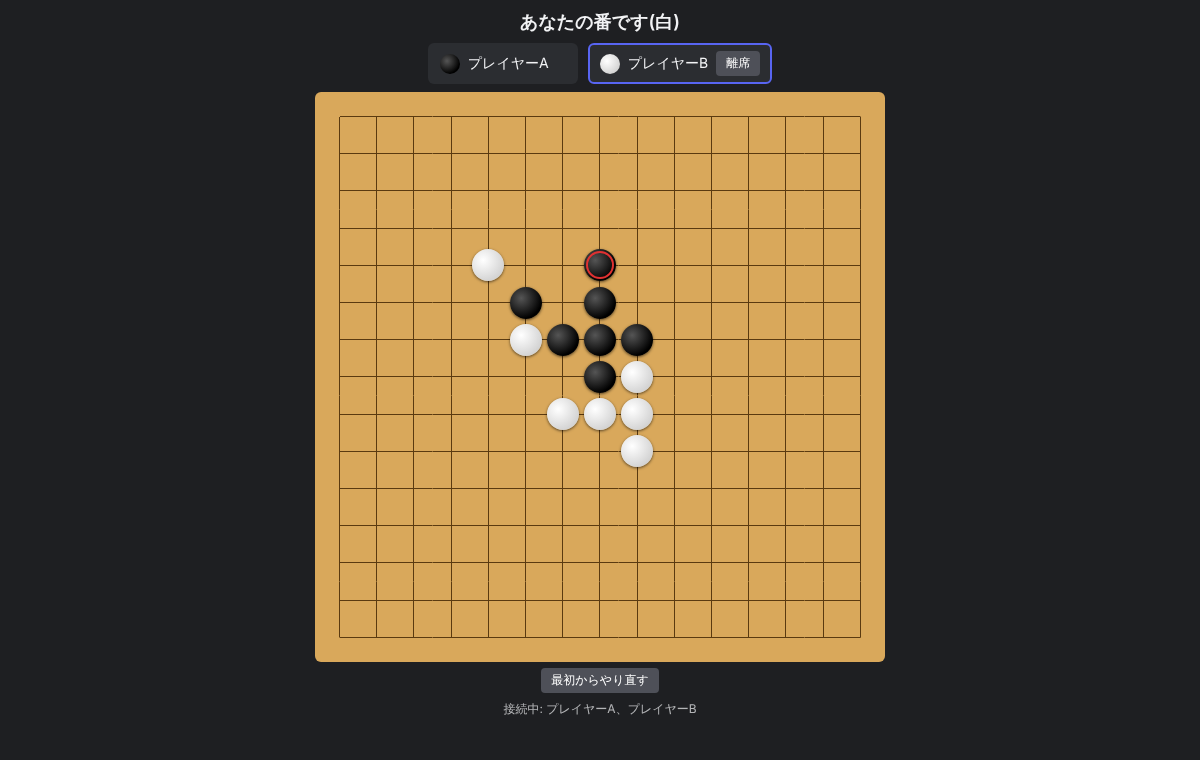
I thought "maybe I'll try making a Discord activity" and made a Gomoku game you can play inside a Discord call. Here's how it works with Cloudflare Workers and Durable Objects, and where I got stuck with login.
About 300 wordsAI

I Started a Blog!
I started hamushiri blog. I am hamushiri, an in-house IT engineer at a small company. This first post is a short self-introduction and what I plan to write about.
About 200 wordsDaily Life
Comments